Vidu Q4
A little imagination. A lot of motion.
YOUR NEXT SCENE STARTS HERE

Vidu Q4 AI Video Generator

Turn images into video.

Explore image-to-video and reference-to-video with Vidu Q4 Preview.
Choose your settings and see the credit cost. Generation is coming soon.

3–16 second videosUp to 4KBuilt-in audio
THE STUDIO

Explore the video creation studio

Vidu Q4 Preview
Video settings
Required

A great first frame makes a great first impression.

Optional
0/2000
Try a mood
Explore the studio. Video generation is opening soon. Sign in to visit My videos.
Loading estimate…Live credit estimate. No credits charged in preview.

Your creations, prompts, and progress — together in My videos.

FROM A STILL IMAGE TO A MOVING SCENE

Vidu Q4 video examples: see the input and result

Three real clips generated with Vidu Q4 Preview through WaveSpeed AI. Watch the camera work, motion, and generated sound. Inspect each source image and the full scene direction.

IMAGE TO VIDEO · 8s · 1080p

Product detail, light, and focus

Material detail · focus transition · camera orbit
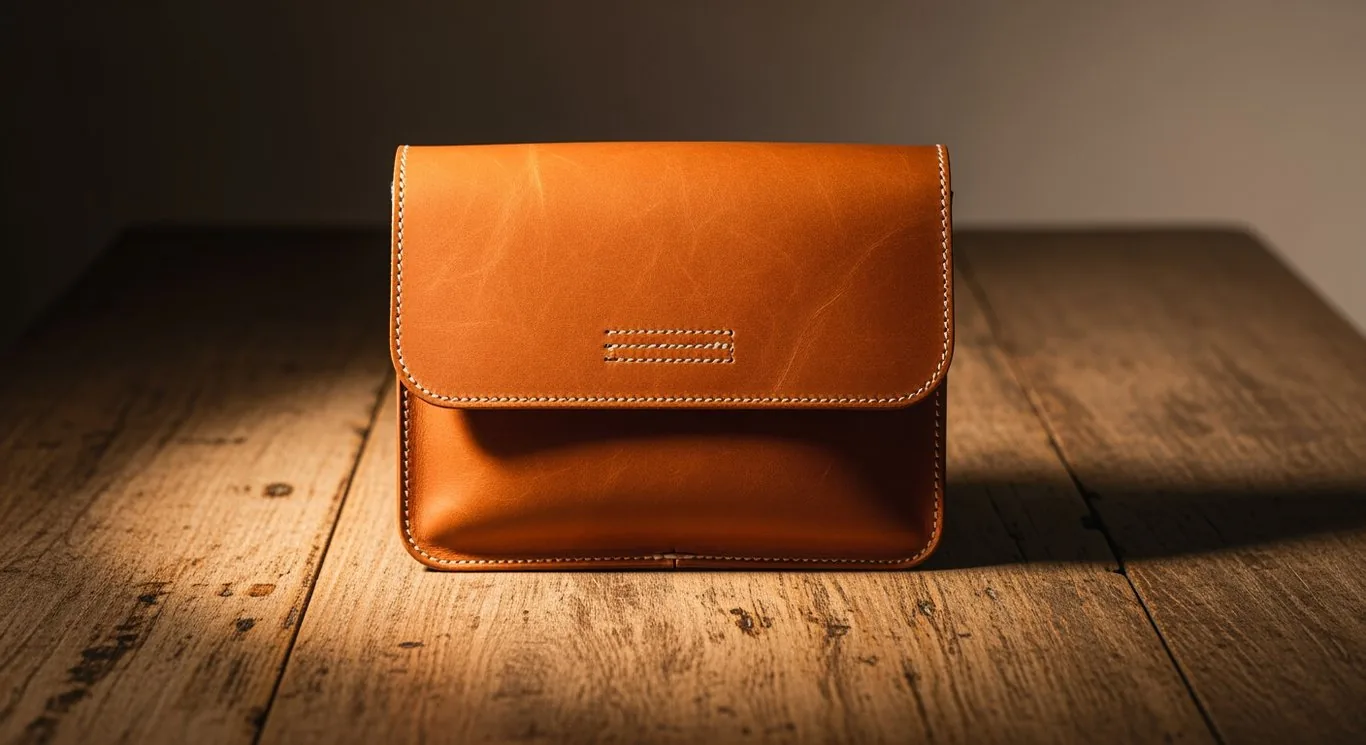
A tan leather bag on a wooden table in warm lightView source image ↗
Read the full scene direction

Create an 8-second photorealistic luxury leather-goods film from this exact opening image. SUBJECT AND CONTINUITY: the same warm cognac leather satchel stays planted on the same aged wooden table. Preserve its rectangular proportions, flap, double rows of cream stitching, embossed leather grain, and position; no invented logo or hardware. CAMERA AND TIMING: 0-2s, begin on the supplied front three-quarter composition, then make a slow stabilized dolly toward the bag with a 70mm macro-lens look. 2-5s, smoothly arc approximately 20 degrees toward its right-hand side while moving closer; reveal the bag's thickness with genuine foreground/background parallax, not a flat image pan. Keep the flap stitching in crisp focus while the far table and wall fall into creamy optical bokeh. 5-8s, ease into a tight detail composition and make one gradual rack focus from the near leather grain to the cream seam on the curved flap; settle for the final half-second. LIGHT AND PHYSICS: one large warm window source from upper left, softly graded amber highlights, realistic fine leather pores, stable stitch spacing, grounded contact shadow, restrained specular roll-off. The moving camera changes the highlights naturally; the light itself does not flash or sweep artificially. SOUND: quiet indoor room tone with a subtle original warm instrumental pad, no speech. TREATMENT: one continuous physically plausible shot, elegant commercial pacing, neutral warm color, natural motion blur, no cuts, no text, no sudden zoom, no melting edges or changing bag geometry.
Explore this mode →
IMAGE TO VIDEO · 8s · 1080p

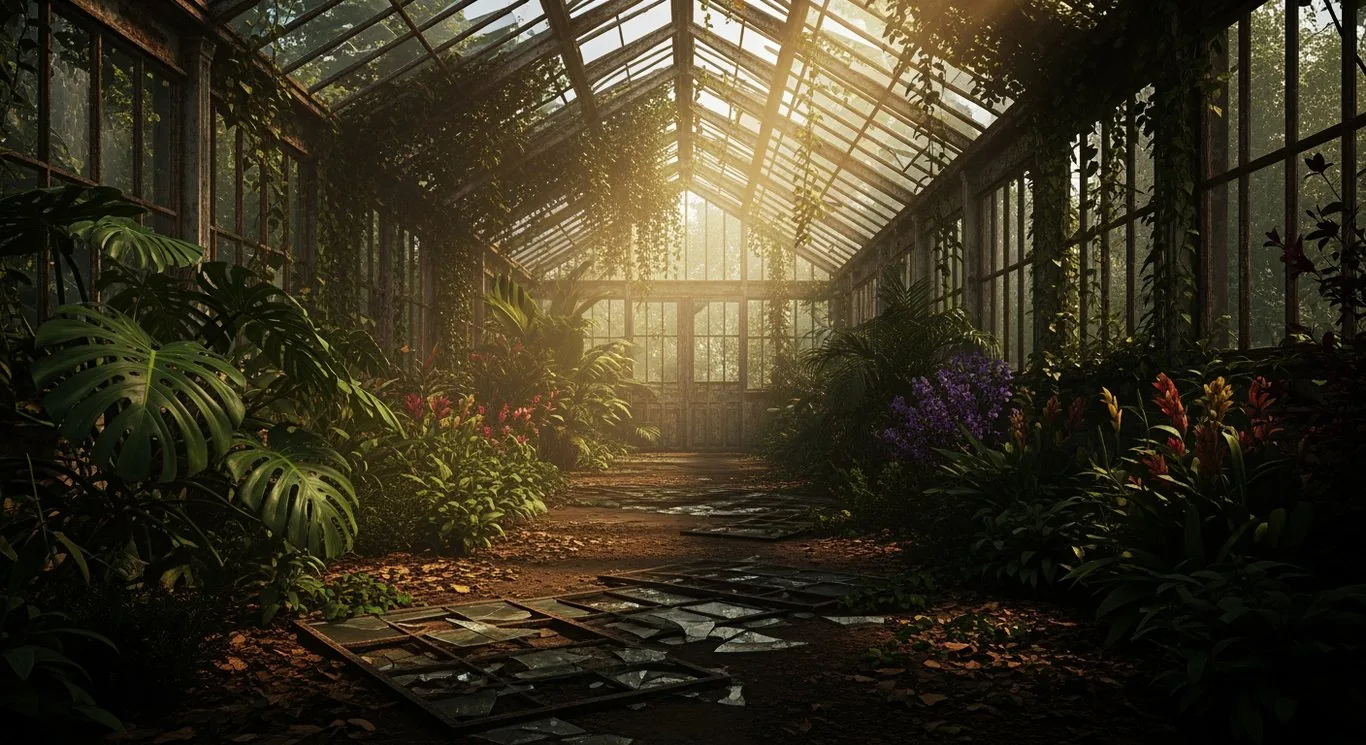
Depth and motion in a greenhouse

Depth and parallax · organic motion · atmosphere

An overgrown glass greenhouse with tropical plants and sunbeamsView source image ↗
Read the full scene direction

Animate the supplied overgrown Victorian greenhouse into an 8-second cinematic nature scene, preserving the exact iron-and-glass architecture, central aisle, warm backlight, and dense tropical planting. CAMERA: a stabilized 28mm lens at waist height travels slowly forward along the aisle in one continuous shot, with a very gentle rise in the final two seconds. TIMING: 0-2s, establish the sunlit space; a large close foreground leaf at frame left drifts gently across the edge of the lens, revealing strong near/far parallax. 2-5s, continue past that leaf while a small pale-gold butterfly lifts from the purple flowers at frame right and flutters naturally toward the central sunbeam, with rapid wingbeats and a slightly irregular rising path. 5-8s, the butterfly recedes toward the distant doorway as the camera eases to a stop, leaving the luminous aisle as the final composition. ENVIRONMENTAL MOTION: a light breeze moves individual leaf tips with different amplitudes and timing, while heavy stems and iron supports remain stable. A few illuminated dust motes drift slowly through the sunbeam; they must not resemble snow or a particle storm. LIGHT AND MATERIAL: realistic translucent leaf edges, soft volumetric rays, deep but readable green shadows, textured old glass, damp earth, warm filmic highlights, consistent exposure. SOUND: soft leaves rustling, a few distant birds, and occasional quiet water drips with a gentle enclosed-space resonance; no music and no speech. A restrained, believable living environment, not a fantasy transformation. No cuts, no camera shake, no architecture bending, no extra insects, no titles or graphics.

Explore this mode →
REFERENCE TO VIDEO · 8s · 1080p

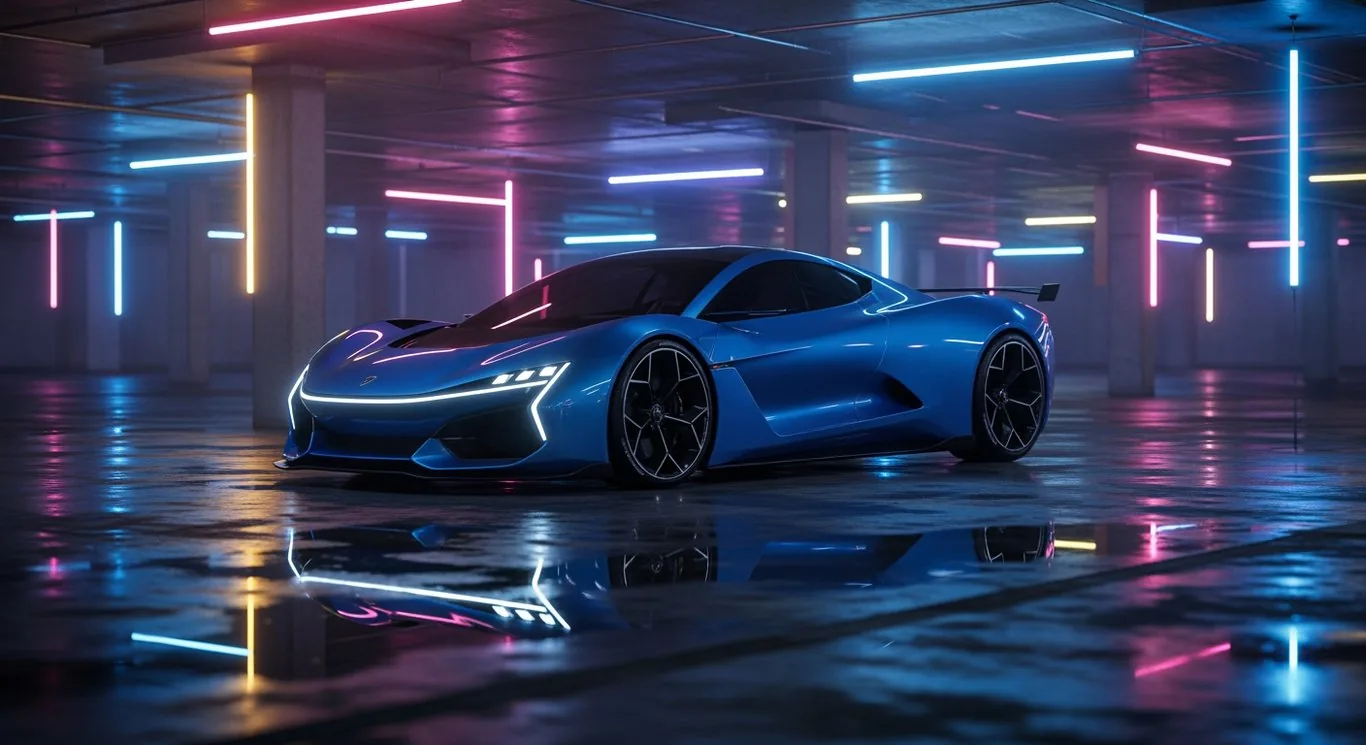
One car, three cinematic shots

Reference consistency · multiple shots · reflections

A blue sports car in a neon-lit underground garageView source image ↗
Read the full scene direction

Create an 8-second premium automotive sequence using the reference image to preserve the identity of one electric-blue sports car: the same low wedge silhouette, black roof and windows, sculpted side intakes, dark multi-spoke wheels, thin white front LED signature, and rear wing. The setting remains a single underground garage with concrete pillars, cyan and magenta tube lights, and shallow rainwater on dark concrete. THREE SHOTS WITH CLEAN HARD CUTS: 0-2.5s, low front three-quarter tracking shot with a 35mm lens as the car rolls slowly forward; the camera retreats at matching speed, keeping the car centered while pillars pass behind it. 2.5-5.5s, cut to a wheel-height side tracking close-up with a 70mm lens: the near front tire visibly rotates at a speed consistent with the moving car, presses through a thin puddle, and sends a small realistic fan of water outward; neon reflections slide continuously over the same blue side panel. 5.5-8s, cut to a wider rear three-quarter view with a 35mm lens as the same car glides between two pillars, then settles to a gentle stop with a subtle realistic suspension response. CONTINUITY: preserve body design, wheel count and design, paint, wing, garage layout, lighting direction, and forward travel direction across all cuts. No car morphing, no drifting, no teleportation, no slow-motion liquid explosions. LIGHT AND SOUND: controlled cyan/magenta highlights, rich blue paint, readable dark details, accurate wet-floor reflections; synchronized quiet electric-motor whine, soft tire hiss, a brief water splash at the puddle, and natural garage reverberation. No roaring combustion engine, music, speech, people, captions, brands, or logos. Photorealistic commercial cinematography with deliberate composition and natural motion blur.

Explore this mode →

AI-generated examples · 1080p generation setting · generated audio. Results and output dimensions vary by input. The studio is still in preview.

KNOW YOUR CREATIVE OPTIONS

What is Vidu Q4 Preview?

Vidu Q4 Preview is an AI video model for animating images and creating scenes from visual and audio references. This independent studio brings its two generation modes, credit estimates, and video history into one place.

Image to video: animate a still image

Start with one JPG, PNG, or WebP image. Add an optional prompt to describe the subject’s movement, camera direction, and atmosphere. Use this mode when you already have the opening frame.

Explore image-to-video settings →

Reference to video: guide a new scene

Write a prompt and add up to 12 reference images and 3 MP3 or WAV audio references. Choose an aspect ratio for your scene, from widescreen 16:9 to vertical 9:16 or square 1:1.

Explore reference-to-video settings →

Video settings and upload limits

Duration
3–16 seconds, in one-second steps
Resolution
540p, 720p, 1080p, 2K, or 4K
Audio
Optional generated audio; audio references in reference-to-video mode
File size
Up to 20 MB per image or audio reference

You can try the inputs and live estimates now. Google sign-in is available. Generation and paid plans are not open yet. Selected files stay in your browser during preview. Read our file handling and privacy information and check the credit costs and planned pricing before creating.

LESS FRICTION. MORE CREATION.

How to create a video with Vidu Q4

Explore the first two steps today. Generation and downloads become available after launch.

01

Choose your image or references

Upload one image, or combine references to guide a new scene.

02

Set motion, duration, and resolution

Describe the motion. Set the length, resolution, and sound. See the credit cost before you create.

03

Generate, track, and download

Track progress in My videos, revisit your prompts, and download your finished takes.

YOUR IDEAS HAVE A HOME

Track your video generations in My videos

My videos shows your latest 50 tasks, including prompts, settings, progress, and finished downloads. Active tasks refresh automatically while you view the dashboard, so you can follow a generation through to its result.

Explore the My videos dashboard
ROOM FOR YOUR NEXT IDEA

Vidu Q4 credit costs and planned pricing

Compare the planned subscriptions and check each video’s estimate in the studio.

Standard

For the spark of an idea.

$9/ month
400 credits / monthAbout 8 videos at 5s / 720p*
  • Image & reference to video
  • All available resolutions, up to 4K
  • Video history & downloads
  • Optional generated audio

Premium

For your bigger creative plans.

$99/ month
5,000 credits / monthAbout 104 videos at 5s / 720p*
  • Image & reference to video
  • All available resolutions, up to 4K
  • Video history & downloads
  • Optional generated audio

*At 48 credits per 5-second video in 720p. Longer videos and higher resolutions use more credits. One credit represents $0.01 of generation cost; subscription prices and included credits are shown above.
Plans are not available to purchase yet. Monthly plan credits reset each billing period.

A FEW THINGS TO KNOW

Frequently asked questions about Vidu Q4

What can I make with Vidu Q4?

Start with a still image and describe how it should move, or use reference images and audio to guide a new scene. The studio supports 3–16 second videos, optional generated audio, and resolutions from 540p to 4K.

Can I generate videos right now?

You can sign in with Google and visit My videos. Video generation and paid plans are coming soon. No credits are charged while you explore.

Is vidu-q4.net the official Vidu website?

No. This is an independent studio and is not affiliated with Vidu or ShengShu. Vidu Q4 Preview identifies the video model the studio is built to use.

Does this studio offer text-to-video without an image?

There is no separate text-to-video mode in this studio. Image to video requires one starting image. Reference to video requires a prompt and lets you add image and audio references to guide the scene.

How are credits calculated?

The cost depends on resolution and duration, rounded up to a whole credit. For example, 5 seconds at 720p costs 48 credits; 5 seconds at 1080p costs 60 credits. The studio shows your estimate before you generate.

Where do I find my previous videos?

After signing in, open My videos. Your dashboard shows your latest 50 tasks, including status, prompts, settings, and completed downloads. In-progress tasks refresh automatically while you view the page.

What happens if a video fails?

Credits reserved for a task are returned when the task is confirmed as failed. If a request is still being confirmed, check its status in My videos rather than submitting a new request.

Which files can I upload?

Use JPG, PNG, or WebP images up to 20 MB each. Image to video starts with one image. Reference to video accepts up to 12 images and 3 MP3 or WAV audio files, each up to 20 MB. Only upload content you have the right to use.

A NEW STORY IS ONE FRAME AWAY

Plan your next image-to-video creation

Explore the studio
Vidu Q4

Give your imagination a little motion.

PricingPrivacyTerms
© 2026 Vidu Q4. An independent service, not affiliated with Vidu or ShengShu.

A quick update